
HP PhotoSmart 1000xi Ink Cartridges
Replacement HP PhotoSmart 1000xi Ink Cartridges from $22.95
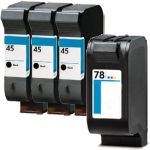
Save $158.16 (64% off retail price)
Buy 3 or more: $88.08 per pack
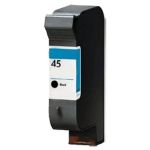
Save $38.04 (62% off retail price)
Buy 3 or more: $22.26 per cartridge
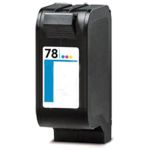
Save $41.04 (62% off retail price)
Buy 3 or more: $24.20 per cartridge
HP PhotoSmart 1000xi Ink Cartridge Replacement Guide
- Make sure that the printer is turned on.
- Open the ink cartridge access door in front of the printer.
- The ink cartridge's carriage might automatically move, so make sure to wait for it to completely stop moving before you proceed.
- Push the ink cartridge down to release it, then pull it out from the printer.
- Get your new CompAndSave HP Photosmart 1000xi printer ink cartridge, and open it over a sink or garbage can to avoid any messes in case it leaks as sometimes, factories tend to overfill ink cartridges. Make sure to touch the black plastic part only, then remove the covering tape that is usually bright in color as well as the plastic protective case, if there is, before installing it.
- Insert the new ink cartridge into its respective slot until it snaps the lock into place.
- Close the ink cartridge access door.
HP PhotoSmart 1000xi Ink Cartridge FAQs
Can I use a different brand of ink in my HP printer?
Yes, you can. Just make sure that the ink cartridge that you are going to use is the right model for your printer. CompAndSave offers replacement, remanufactured, or compatible ink cartridges that are designed to match the OEM specifications. This means that you can get the same quality and number of prints without paying as much compared to original ink cartridges. For more information, click ink knowledge base and you will be redirected to the right page.
Can you put 2 black ink cartridges in an HP printer?
No, you can't. The slot for the color ink cartridge is only for the color cartridge. Your printer will automatically detect it as an incorrect cartridge and will not print. Doing this might cause some printing issues, so make sure to only install the correct cartridge to its correct slot.
Replacement HP PhotoSmart 1000xi Ink Cartridges Reviews
-
Skeptical about Reordering InkReview for HP 78 / C6578DN / C6578D Replacement Tri Color Ink Cartridge
Unfortunately Ink colors appear off and go from a bit light to horizontal lines to a bit muddy.
Was this review helpful? -
I would definetely buy this productReview for HP 45 / 51645a Replacement Black Ink Cartridge
brochures for city council campaign
Was this review helpful? -
Pleasantly surprisedReview for HP 45 / 51645A Black & HP 78 / C6578DN / C6578D Color (4-pack) Replacement Ink Cartridges (3x Black, 1x Color)
Have bought refilled cartridges before which leaked all over the inside of my printer and then didn't work even though they were still full. These worked great and I will buy again.
Was this review helpful?