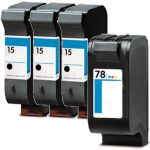
Please enable your cookies to get the best possible experience. Some of the important main functionality might not work without it. Learn more on how to enable cookies on your browser.
CompAndSave is proud to offer affordable prices on our replacement HP PSC 720 ink cartridges that boast genuine-like quality and satisfaction. Why choose CompAndSave in shopping for HP 720 ink cartridges?
LOWER PRICE, SAME QUALITY. Our HP cartridges are designed to ensure you get the same quality as OEM cartridges at a much lower price. If you want to know your savings per print, check out our guide on how to calculate printing cost per page.
MADE WITH PRECISION. Worried about the installation of your new replacement HP ink cartridges? Don't be. CompAndSave's cartridges are designed to work and perform like the original ones.
BUMP UP YOUR SAVINGS. Enjoy bigger discounts if you order HP PSC 720 ink cartridges in bulk. We have single and combo-pack cartridges available. Mix and match different quantities to find the price break that's within your budget.
NEXT DAY SHIPPING. HP 720 ink cartridge orders placed before 2:00 p.m. PST Monday through Friday will be processed the same day. Orders placed after 2:00 p.m. PST will be processed the following business day. Check our Shipping Policy for more information.
FREE SHIPPING. For U.S. orders, checking out $50 or more means the shipping fee is on us!
ECO-FRIENDLY SOLUTIONS. Did you know that our replacement or remanufactured cartridges are environmentally friendly? Instead of throwing away empty original HP cartridges, our manufacturer meticulously recycles them to function exactly like the originals. By purchasing our replacement HP PSC 720 ink cartridges, you will not only save a ton of money, but you will also be helping to preserve the environment.
SATISFACTION GUARANTEE. CompAndSave is so confident in the quality of our replacement HP ink cartridges that we offer a FULL refund for orders returned within ten days upon delivery. We even issue refunds or store credits up to 365 days from purchase! Make sure to read our Return Policy for more details.
WILL NOT VOID PRINTER WARRANTY. Using a replacement HP PSC 720 ink cartridge will never void your printer warranty. Visit our Ink Knowledge Base page for more details, or contact us for other concerns.
Take advantage of our exclusive prices for HP 720 ink cartridges now. Get more SAVINGS without sacrificing quality today!
All ink & toner come with 1-year 100% satisfaction guarantee.
Our products will never void your printer's warranty.
Open the ink cartridge access door in front of the printer.
The ink cartridge's carriage might automatically move, so make sure to wait for it to completely stop moving before you proceed.
Push the ink cartridge down to release it, then pull it out from the printer.
Get your new CompAndSave HP PSC 720 printer ink cartridge, and open it over a sink or garbage can to avoid any messes in case it leaks as sometimes, factories tend to overfill ink cartridges. Make sure to touch the black plastic part only, then remove the covering tape that is usually bright in color as well as the plastic protective case, if there is, before installing it.
Insert the new ink cartridge into its respective slot until it snaps the lock into place.
Close the ink cartridge access door.
HP PSC 720 Ink Cartridge FAQs
Why is HP ink so expensive?
OEM ink manufacturers claim that the high cost of ink cartridges is due to the research and development of technologies to deliver high-quality ink. However, it is worth noting that there are generic cartridges that exceed OEM requirements while being less expensive than their counterparts. CompAndSave's compatible and replacement ink cartridges are engineered to meet or exceed OEM standards. That is to say, you can have the same print quality and page output without spending a fortune. Please keep in mind that using generic, remanufactured, or replacement cartridges will never void the warranty on your printer. For additional information, please visit ink knowledge base and you will be redirected to the right page.
How do I make my HP printer not use HP ink?
Remanufactured or replacement ink cartridges usually work instantly without doing any configuration. But in case your printer doesn't accept them, you may try to disable the "HP Cartridge Protection" by accessing the " HP printer software", then go to "Settings". Look for "HP Cartridge Protection" and then "Disable" it.
Replacement HP PSC 720 Ink Cartridges Reviews
2Customer Reviews
4 out of 5 stars
Sort by
Rating
Newest
Helpfulness
Review for
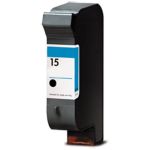
HP 15 / C6615DN / C6615D Replacement Black Ink Cartridge
Apr 21, 2025
By:
Kenneth
Verified Buyer
I recommend this product
Fast delivery and cartridge worked well
Was this review helpful?
Skeptical about Reordering Ink
Review for
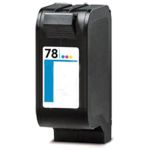
HP 78 / C6578DN / C6578D Replacement Tri Color Ink Cartridge
Nov 9, 2022
By:
Marie&Debbie
Verified Buyer
Unfortunately Ink colors appear off and go from a bit light to horizontal lines to a bit muddy.
Was this review helpful?
Mark as My Printer
Enter your email address to save printer in your profile.
Create an Account with Us
Looks like you haven't had an account with us yet. Start by creating an account with us to save this printer under your profile.
Log in to Your Account
Create an account with us to save this printer under your profile. Already have an account? Login to your account.