
HP DeskJet 930p Ink Cartridges
Replacement HP DeskJet 930p Ink Cartridges from $22.95
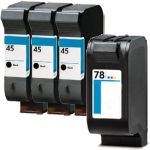
Save $158.16 (64% off retail price)
Buy 3 or more: $88.08 per pack
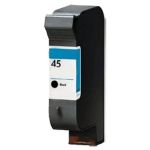
Save $38.04 (62% off retail price)
Buy 3 or more: $22.26 per cartridge
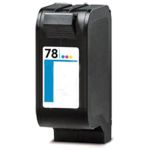
Save $41.04 (62% off retail price)
Buy 3 or more: $24.20 per cartridge
How to Install HP DeskJet 930p Ink Cartridges?
- Make sure that the printer is turned on and the output tray is down.
- Open the printer's ink access cover. The ink cartridge's carriage will automatically move, so make sure to wait for it to completely stop moving before you proceed.
- Open the lid covering the ink cartridge and carefully pull the ink cartridge out from the printer.
- Get your new CompAndSave HP DeskJet 930p printer ink cartridge, open it over a sink or garbage can to avoid any messes in case it leaks as sometimes, factories tend to overfill ink cartridges. Make sure to touch the black plastic part only, then remove the covering tape that is usually bright in color as well as the plastic protective case, if there is, before installing it.
- Insert the new ink cartridge to its respective slot and close the lid to secure the cartridge.
- Close the printer's ink access cover.
HP DeskJet 930p Ink Cartridges FAQ
- What ink does HP DeskJet use?
- HP DeskJet printers use different kinds or models of ink cartridges. To know the model number of the cartridge your DeskJet printer is using, you may check the user's manual that came with your printer. You may also check the existing cartridge that is installed in your printer. In front or on the side is a label or sticker with the model number, which is usually consisted of alphanumeric characters. For example, the HP DeskJet 930p printer uses the ink cartridge that has the model code of HP 45 for black and HP 78 for tri-color.
- Can I use a different number ink cartridge for my HP printer?
- No, you can't. Each HP printer has designated ink cartridges for them. These cartridges have different sizes, yields, and compatibility. Your printer will not recognize the cartridge if it's the wrong one. Using the wrong ink cartridge on your HP printer might cause some issues. To know the model number of the cartridge your printer is using, you may check the user's manual that came with your printer. You may also check the existing cartridge that is installed in your printer. In front or on the side is a label or sticker with the model number, which is usually consisted of alphanumeric characters. For example, the HP DeskJet 930p printer uses the ink cartridge that has the model code of HP 45 for black and HP 78 for tri-color.
Replacement HP DeskJet 930p Ink Cartridges Reviews
-
Skeptical about Reordering InkReview for HP 78 / C6578DN / C6578D Replacement Tri Color Ink Cartridge
Unfortunately Ink colors appear off and go from a bit light to horizontal lines to a bit muddy.
Was this review helpful? -
I would definetely buy this productReview for HP 45 / 51645a Replacement Black Ink Cartridge
brochures for city council campaign
Was this review helpful? -
Pleasantly surprisedReview for HP 45 / 51645A Black & HP 78 / C6578DN / C6578D Color (4-pack) Replacement Ink Cartridges (3x Black, 1x Color)
Have bought refilled cartridges before which leaked all over the inside of my printer and then didn't work even though they were still full. These worked great and I will buy again.
Was this review helpful?